As we approach the new year, it’s time to ensure your practice is equipped with the latest tools and resources to stay efficient and compliant. One of the most important updates for dental practices is the release of the 2026 Dental Fee Guides. Whether you’re using ABELDent LS or our new version, ABELDent v15 (also known as ABELDent Cloud or Local Plus), we’ve made it easy for you to access and install the fee guides that your practice needs.
Easier Fee Guide Installations – Update to ABELDent v15!
If you’re still using ABELDent LS, now is the perfect time to consider updating your software to ABELDent Version 15 (otherwise known as ABELDent Cloud or Local Plus). With ABELDent v15, you gain access to:
- Enhanced security powered by Microsoft Azure Cloud.
- Automatic updates that keep your software up to date with the latest version without having to install them manually.
- Access to New Features & Improved performance and usability, time-saving tools, and improved navigation and UI.
- Built-in patient communication tools, eliminating the need for third-party communication software.
ABELDent v15 is designed to meet the evolving needs of modern dental practices. Whether you’re looking to improve data protection, streamline operations, or reduce IT overhead, ABELDent v15 offers a robust solution.
For ABELDent Pre-v15 Users
If you’re using a version of ABELDent prior to v15, your 2026 fee guides are available for download on the MyABEL website. Simply log in to MyABEL and select the fee guides relevant to your practice. We work diligently to upload new guides as soon as they’re released, so be sure to check back regularly for updates.
Need help installing your fee guide? Watch our step-by-step instructional video on MyABEL, which walks you through the process from login to installation. If you run into any issues, our team is here to help you.
For ABELDent v15 Users (Cloud and Local Plus Users)
If you’ve already upgraded to ABELDent v15, updating your fee guides is even easier. Here’s how:
- To start, ensure you have the “Update Dental Fee Guides” checkbox selected under the System Configuration settings in your Authorization Manager.
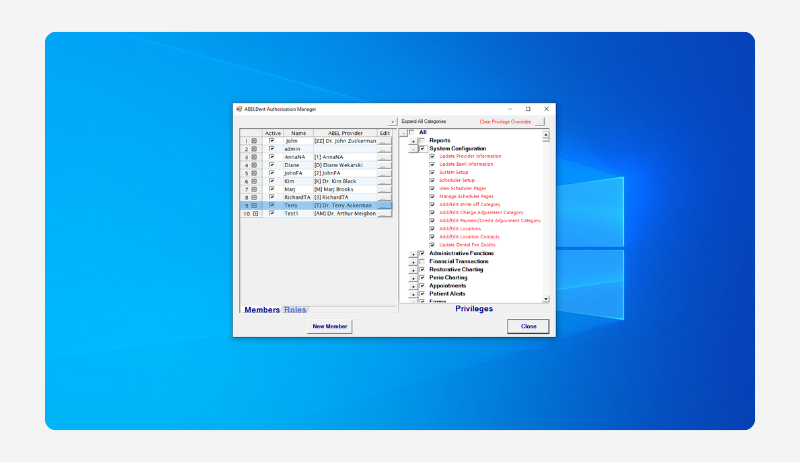
- Open your ABELDent v15 program.
- Navigate to the File menu on your toolbar.
- Select Update, then choose the Dental Fee Guide option.
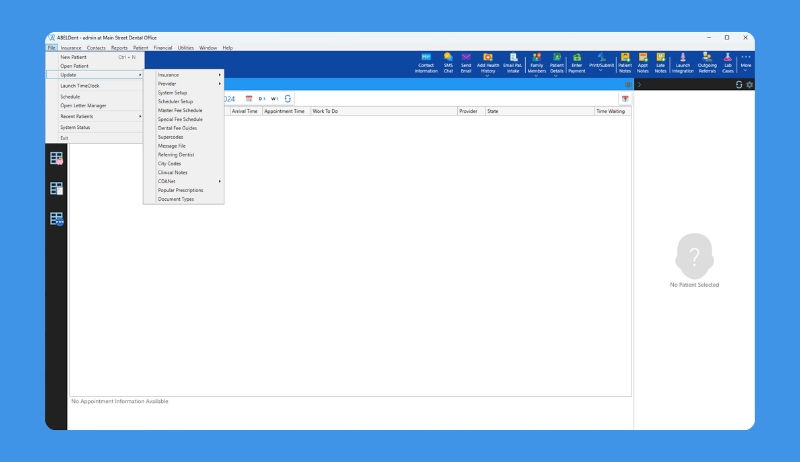
- In the Update Dental Fee Guide window, select your province and the fee guides you wish to install. You can select as many fee guides as you need.
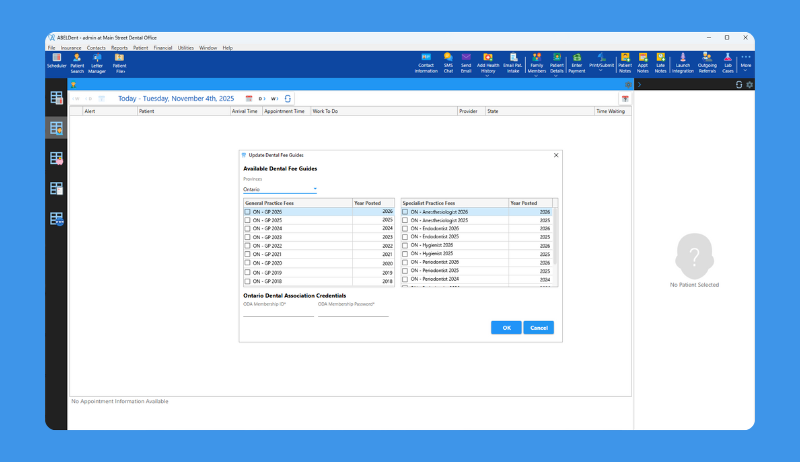
- If required by your province’s dental association, enter your credentials. This step will differ depending on the province you are located in.
- Click OK, and your selected fee guides will be updated in your ABELDent v15 program.
This streamlined process ensures your practice can easily apply updated fee guides to your program with minimal disruption.
Need Help?
The ABELDent team is available to assist you with fee guide updates, software upgrades, and any questions you may have. Don’t hesitate to reach out – we are here to support your dental practice.